
Keeping track of orders is easy in MEPHUB. Whether you’re searching for a specific order or browsing by job, there are two main ways to locate what you need:
✅ Option 1: Use the Orders Page (Main Search) #
The Orders page is your central hub to view, filter, and search all orders in the system.

🔄 Filter Options #
At the top of the Orders page, you can filter your results by:
- Type: Materials, Rentals, Subs, or Assets
- Status: such as Open, RFQ Sent, PO Sent, or Cancelled
This helps narrow the list down to just the orders you care about.
🔍 Search Bar #
You can also use the search bar to instantly find orders by:
- Job Name
- Order Number
Start typing, and matching results will appear. This is the fastest way to locate a specific order if you know part of the name or number.
✅ Option 2: View Orders by Job #
If you’re looking for orders tied to a specific project or jobsite, navigate to the Job Detail Page.
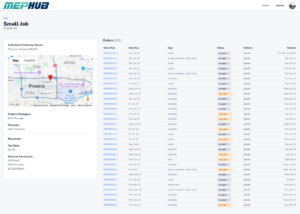
There, you’ll see:
- Job location, map, and project details
- A dedicated Orders List filtered to that job only
- Order status, delivery type, and due dates
💡 Why use the Job View? #
✅ Focus only on one job’s orders
✅ Quickly review order statuses for the project
✅ Easier for field teams managing specific jobs
✅ Pro Tip: #
Use job filtering when managing large projects with multiple orders or when you only care about your specific jobsite. Use the Orders page for company-wide visibility.
📥 Still Can’t Find It? #
- Double-check your search keywords
- Try filtering by different statuses or types
- If you still need help, contact your Org Admin or MEPHUB Support